


Be Events
The Be Events widget allows you to display multiple upcoming events on your website in a clean and engaging layout. Visitors can quickly browse events, see important details, and take action, such as registering, buying tickets, or learning more.
This widget is ideal for showcasing upcoming events on your homepage, campaign pages, or dedicated event sections. Each event card can display key information such as event title, date, location, and a direct Register or Learn More button.
Key Features
- Display multiple events in a responsive grid or list layout
- Show event dates, locations, and times for each item
- Include a direct call-to-action button for registration or details
- Fully customizable with Elementor styling controls
- Perfect for homepage event highlights, campaign pages, or dedicated event sections
Frontend Example
Below is an example of how the Be Events widget appears on the frontend of your website.
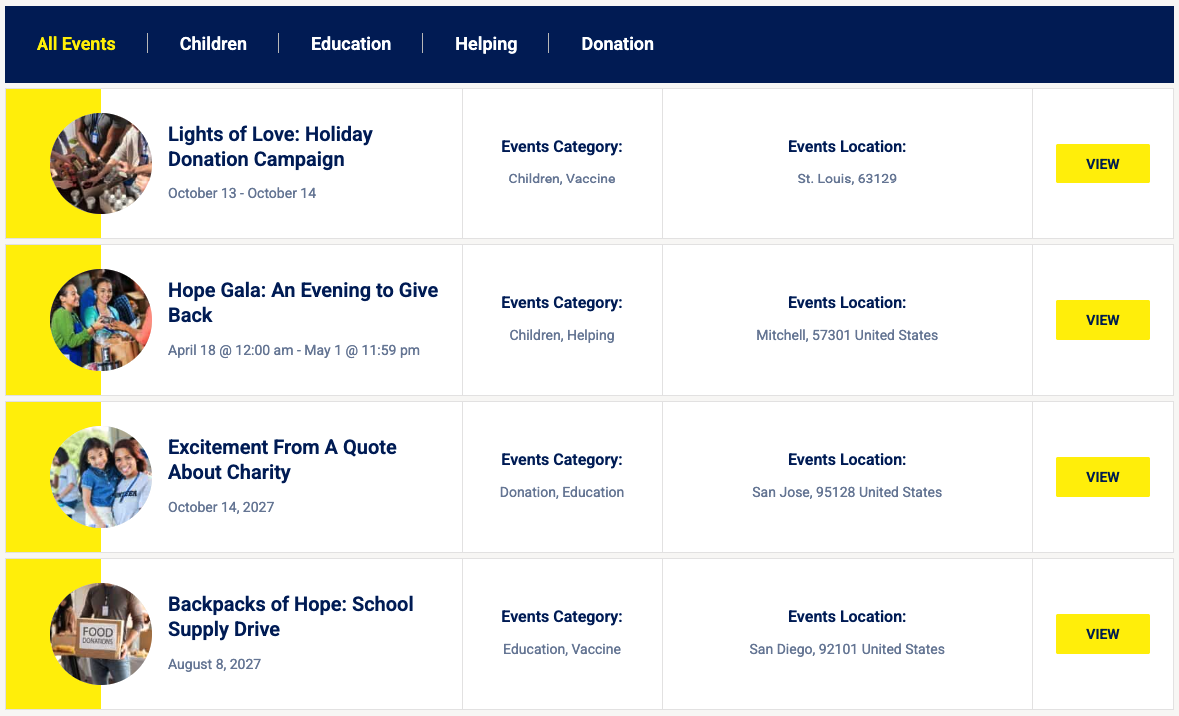
Each event card can display:
- Event title
- Featured image
- Event date and time
- Location or venue
- Short description
- Register / Learn More button
This layout makes it easy for visitors to quickly see upcoming events and take action.
Backend Settings
The widget includes several configuration options within the Elementor editor, allowing you to control how events are displayed on your website.
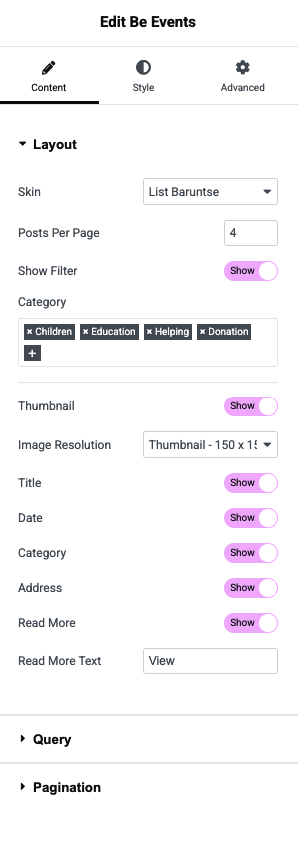
Available Options
- Select Events – Choose one or multiple events to display
- Number of Events – Control how many events appear in the widget
- Layout Settings – Configure columns, spacing, and layout style (grid or list)
- CTA Button Settings – Customize the call-to-action text and styling
- Style Controls – Adjust colors, typography, and spacing using Elementor controls
💡 Tip:
Use the Be Events widget on your homepage or event pages to highlight upcoming events and make it easy for visitors to register or learn more.