


Frequently Bought Together
Configure products that are frequently bought together to encourage cross-selling and increase average order value.
These settings are configured individually for each product in the product edit page. Go to Products → All Products, edit a product, and navigate to the Linked Products tab to configure frequently bought together products.
Settings
In the Linked Products tab of the product editor, find the Frequently Bought Together section:
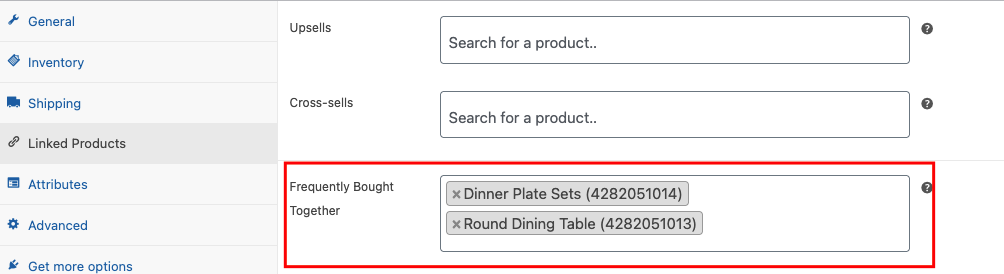
Adding Products:
- Click in the Frequently Bought Together field
- Search for products by typing the product name
- Select products from the dropdown list
- Selected products will appear as tags that can be removed by clicking the 'x' icon
- Save the product to apply changes
Frontend Display
When configured, customers will see a "Frequently Bought Together" section on the product page with product listings, checkboxes, prices, and an Add Selected to Cart button.
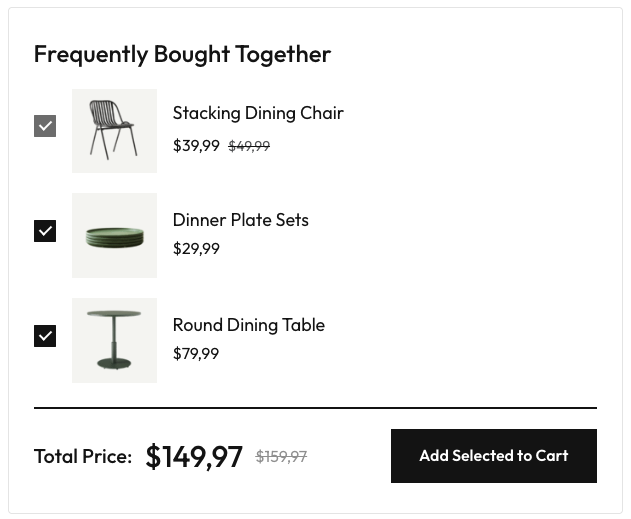
Use frequently bought together to suggest complementary products that enhance the main product and increase average order value.