


Be Give Form
The Be Give Form widget allows you to display a GiveWP donation form directly on any page of your website. This makes it easy for visitors to contribute without needing to navigate to a separate donation page.
Using this widget, you can embed a donation form anywhere on your site, such as on the homepage, campaign pages, or dedicated fundraising sections. This helps create a smooth donation experience and encourages visitors to support your cause.
The Be Give Form widget integrates seamlessly with GiveWP, allowing you to display your existing donation forms while maintaining a consistent design with Elementor.
Key Features
- Embed a GiveWP donation form directly on your page
- Allow visitors to donate instantly without leaving the page
- Fully customizable with Elementor styling controls
- Ideal for homepage fundraising sections or campaign pages
- Seamless integration with GiveWP donation forms
Frontend Example
Below is an example of how the Be Give Form widget appears on the frontend of your website.

The form may include:
- Donation amount options
- Custom donation input
- Donor information fields
- Payment method selection
- Donate button
This layout allows visitors to complete their donation directly from the page.
Backend Settings
The widget provides several configuration options within the Elementor editor, allowing you to control which donation form is displayed.
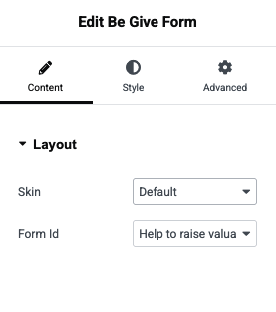
Available Options
- Select Donation Form – Choose the GiveWP form you want to display
- Display Style – Configure layout and form appearance
- Form Settings – Control how the donation form behaves
- Style Controls – Customize typography, spacing, and colors using Elementor controls
💡 Tip:
Use the Be Give Form widget on landing pages or campaign sections to make donating quick and convenient for your visitors.