


Be Give Forms
The Be Give Forms widget provides an easy way to display multiple donation campaigns on your website while giving visitors quick access to each individual donation form.
With this widget, you can showcase several GiveWP donation forms in an interactive grid layout anywhere on your site. This helps donors quickly browse available campaigns and choose the cause they would like to support.
Each campaign card can display key information such as the campaign title, fundraising progress, and a direct Donate Now button, making it easier for supporters to contribute.
Key Features
- Display multiple GiveWP donation forms in a responsive grid layout
- Show fundraising goals and progress bars for each campaign
- Provide a quick Donate button for easy access to the donation form
- Fully customizable with Elementor styling controls
- Perfect for homepage campaign sections or dedicated fundraising pages
Frontend Example
Below is an example of how the Be Give Forms widget appears on the frontend of your website.

Each campaign card can display key information to help visitors quickly understand the fundraising progress and support the cause.
This layout may include:
- Campaign title
- Featured image
- Amount raised
- Fundraising goal
- Donation progress bar
- Donate Now button
By presenting multiple campaigns in a clear grid layout, donors can easily browse available causes and choose the one they want to support.
Backend Settings
The widget includes several configuration options within the Elementor editor, allowing you to control how donation campaigns are displayed on your website.
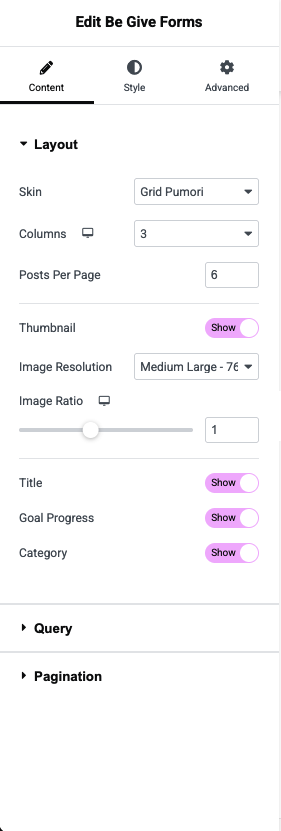
Available Options
- Select Forms – Choose one or multiple GiveWP donation forms to display.
- Number of Campaigns – Define how many campaigns appear in the widget.
- Layout Settings – Configure columns, spacing, and grid layout.
- Progress Bar Toggle – Enable or disable the fundraising progress indicator.
- Button Settings – Customize the donation button text and styling.
- Style Controls – Adjust colors, typography, and spacing using Elementor controls.
💡 Tip:
Use the Be Give Forms widget on your homepage or fundraising pages to showcase active campaigns and encourage visitors to support your causes with just one click.