


Be Give Totals
The Be Give Totals widget allows you to display the total amount of donations collected from multiple donation forms on your website. It is designed to work seamlessly with GiveWP and is ideal for showcasing the overall impact of your fundraising campaigns.
With this widget, you can combine the totals from several donation forms and present them as a single fundraising progress indicator. This helps visitors quickly understand how much has been raised across multiple campaigns.
You can also choose whether to display the totals with or without a progress bar, making it flexible for different design layouts.
Key Features
- Display combined donation totals from multiple GiveWP forms
- Option to show progress bars with fundraising goals
- Fully customizable using Elementor
- Perfect for homepage fundraising highlights or campaign summaries
- Works smoothly with multiple donation campaigns
Frontend Example
Below is an example of how the Be Give Totals widget appears on the frontend of your website.
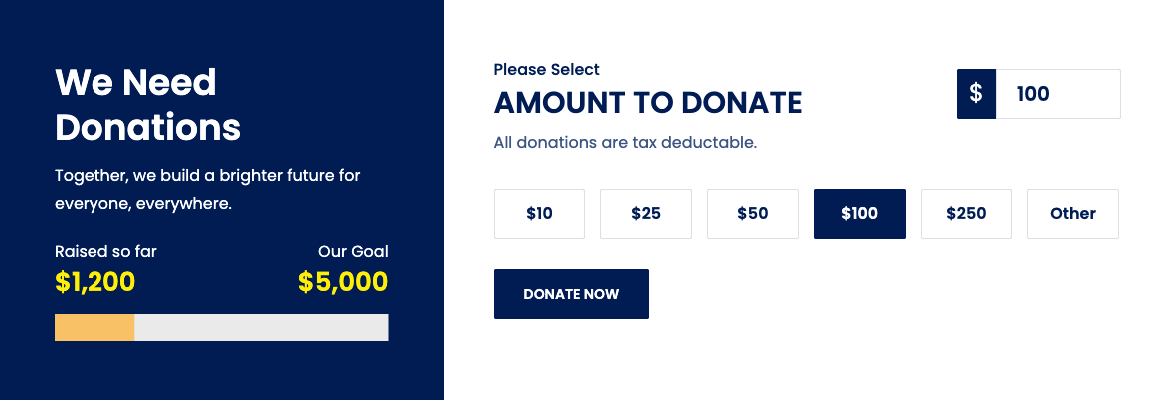
This layout can show:
- Total amount raised
- Fundraising goal
- Donation progress bar
- Campaign summary
Backend Settings
The widget provides several configuration options in the Elementor editor, allowing you to control how the donation totals are displayed.
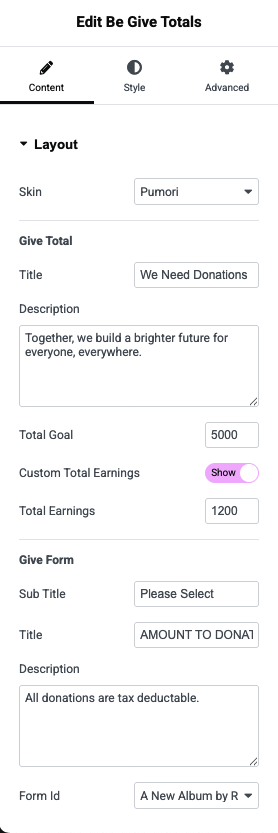
Available Options
- Select Donation Forms – Choose one or multiple GiveWP forms to include in the total calculation.
- Set Goal Amount – Define the overall fundraising target.
- Enable Progress Bar – Display a visual progress bar showing donation progress.
- Customize Layout – Adjust styling, typography, and colors using Elementor controls.
💡 Tip:
Use the Be Give Totals widget on your homepage or campaign landing pages to clearly highlight the overall impact of your fundraising efforts and encourage more donations.