


Be Posts
The Be Posts widget allows you to display WordPress posts on your website in a clean and flexible layout. It helps visitors easily browse recent or featured articles while keeping your content organized and visually engaging.
With this widget, you can showcase posts in a grid or list layout anywhere on your website, such as your homepage, blog sections, or landing pages. Each post card can include key elements like the featured image, title, excerpt, metadata, and a Read More button.
This makes it easy for visitors to discover your latest content and navigate to full articles.
Key Features
- Display multiple WordPress posts in a responsive layout
- Support grid or list layouts for flexible design
- Show featured images, titles, excerpts, and post metadata
- Include a Read More button linking to the full article
- Fully customizable with Elementor styling controls
- Ideal for blog sections, homepage highlights, or news pages
Frontend Example
Below is an example of how the Be Posts widget appears on the frontend of your website.
Each post card may display:
- Featured image
- Post title
- Post excerpt or summary
- Author name
- Publish date
- Category or tags
- Read More button
This layout helps visitors quickly browse articles and access the full content with a single click.
Backend Settings
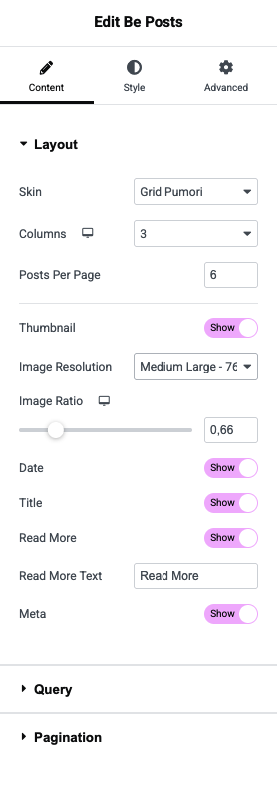
The widget includes several configuration options within the Elementor editor, allowing you to control how posts are displayed on your website.
Available Options
- Select Post Source – Choose posts by category, tag, or manual selection
- Number of Posts – Control how many posts appear in the widget
- Layout Settings – Configure columns, spacing, and display layout
- Content Display Options – Enable or disable elements such as excerpt, author, date, or categories
- Read More Button Settings – Customize button text and style
- Style Controls – Adjust colors, typography, and spacing using Elementor controls
💡 Tip:
Use the Be Posts widget on your homepage or blog pages to highlight recent or featured articles and encourage visitors to explore more of your content.